





I’m a Software Engineer, currently at the Apple Developer Academy. This is a story about how I took a simple feature and made it intelligent: entirely on-device, without sending a single byte to the cloud.
Most iOS apps start the same way. You need to respond to user input, so you reach for the most natural tool available: a switch statement.
func suggestRecipe(for ingredient: String) -> String {
    switch ingredient {
    case "pasta": return "Try Cacio e Pepe"
    case "chicken": return "Try Grilled Lemon Chicken"
    default: return "No suggestion available"
    }
}
Clean, readable, and fast to write. It works, and for a while that’s enough.
Then the edge cases arrive, users type things you never mapped, the function returns No suggestion available, and a simple tool becomes a maintenance problem.
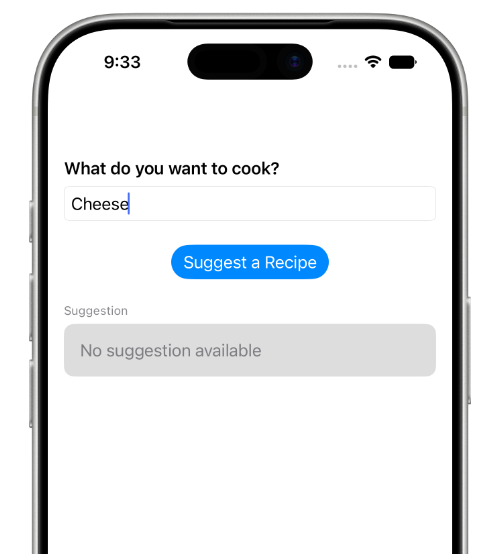
That’s where Apple Foundation Models comes in.
What It Is
Apple Foundation Models is a framework introduced in iOS 26 that gives your app direct access to the on-device AI model powering Apple Intelligence. It runs entirely on Apple Silicon:
- No server
- No API key
- No internet connection
The data never leaves the device. Not to Apple, not to anyone.
If you’re building something that handles health data, personal information, or accessibility needs, that distinction matters more than almost anything else.
There is a trade-off. This isn’t a general-purpose AI: it’s a focused, on-device model built for specific tasks:
- Summarization
- Entity extraction
- Classification
- Structured generation
- Short creative content
Work with that, and it’s fast, private, and effective.
Step 1 – Replace the Switch with a Session
The entry point is LanguageModelSession – think of it as a conversation that’s stateful, context-aware, and simple to start.
Here’s that same recipe assistant, rewritten:
import FoundationModels

private let session = LanguageModelSession(instructions: "You are a helpful cooking assistant.")

func suggestRecipe(for ingredient: String) async throws -> String {
    let response = try await session.respond(to: "Suggest a simple recipe using \(ingredient)")
    return response.content
}
It works with any ingredient, any combination – no switch statement, no hardcoded cases. The model figures it out.
But you get back a String, and strings are unstructured, unpredictable, and difficult to work with in a real UI. So let’s fix that.
Step 2 – Make the Output Typed with @Generable
Without structure, you’re back to parsing. You ask the model for JSON, it returns something close to JSON, and one malformed response breaks everything:
let text = try await session.respond(
    to: "Suggest a pasta recipe. Reply in JSON with name, description, and ingredients."
).content

guard let data = text.data(using: .utf8),
      let json = try? JSONSerialization.jsonObject(with: data) as? [String: Any],
      let name = json["name"] as? String,
      let ingredients = json["ingredients"] as? [String] else {
    return
}
@Generable is the right approach. You define a Swift struct, mark it with @Generable, and the framework instructs the model to return data in that exact shape – giving you a real, typed Swift object back with no parsing, no guesswork, just Swift:
@Generable
struct RecipeSuggestion {
    let name: String
    let description: String
    let ingredients: [String]
}

let result = try await session.respond(
    to: "Suggest a simple pasta recipe",
    generating: RecipeSuggestion.self
)

print(result.content.name)        // "Aglio e Olio"
print(result.content.ingredients) // ["spaghetti", "garlic", "olive oil", ...]
I used this in Artem, my accessibility app for deaf and non-verbal users: Vision processes a gesture, the model returns a typed description, the UI renders it – a clean pipeline with no fragile code in between.
Step 3 – Control the Output with @Guide
There’s still a problem. The model decides how many ingredients to return, sometimes three, sometimes eight. So you add a validation loop and retry:
var suggestion: RecipeSuggestion?

repeat {
    let result = try await session.respond(
        to: "Suggest a pasta recipe with exactly 5 ingredients",
        generating: RecipeSuggestion.self
    )
    suggestion = result.content
} while suggestion?.ingredients.count != 5
It can work, but it’s wasteful and unpredictable.
@Guide is the better answer. You annotate each property with exactly what you want – a description, a count, a fixed set of values – and the model follows those rules every time:
@Generable
struct RecipeSuggestion {
    @Guide(description: "A short, appetizing dish name")
    let name: String

    @Guide(description: "One sentence describing the dish")
    let description: String

    @Guide(.count(5))
    let ingredients: [String]

    @Guide(.anyOf(["easy", "medium", "hard"]))
    let difficulty: String
}
Always exactly five ingredients, always one of three difficulty levels, no retries, no surprises.
You declare the rules once. The model follows them every time.
In Maieutic, my Socratic dialogue educational app, this kept every output structured from the first call. Type-safety alone saved hours of defensive code.
Step 4 – Stream It as It Generates
The feature works, but the user taps the button and waits while the full recipe loads at once.
That’s the old behavior:
let result = try await session.respond(
    to: "Suggest a recipe using tomatoes",
    generating: RecipeSuggestion.self
)
self.recipe = result.content // everything appears at once
Streaming changes that. The model fills in each property as it generates, and your UI updates in real time:
@State private var partial: RecipeSuggestion.PartiallyGenerated?

private func generate(for ingredient: String) async {
    do {
        for try await update in session.streamResponse(
            to: "Suggest a recipe using \(ingredient)",
            generating: RecipeSuggestion.self
        ) {
            partial = update
        }
    } catch {
        // handle generation error
    }
}
The name appears first, then the description, then each ingredient one by one. The experience feels alive – not a result waiting to load, but something actively being created.
One Thing That Must Come First
Now that you’ve built all 4 steps, there’s one thing that must be in place before any of them can run: Apple Intelligence must be enabled on supported hardware – skip this check and your app crashes.
private func checkAvailability() {
    switch SystemLanguageModel.default.availability {
    case .available:
        break
    case .unavailable(let reason):
        switch reason {
        case .appleIntelligenceNotEnabled:
            // prompt user to enable in Settings > Apple Intelligence
        case .deviceNotEligible:
            showFallback()
        case .modelNotReady:
            // model still downloading, retry later
        default:
            break
        }
    }
}
In Onco Story, my Swift Student Challenge 2026 submission, this was the first thing the app checked – one guard, no crashes, a fallback ready for every case.
Also call session.prewarm() early in the app lifecycle. The first inference after a cold launch is slow – prewarming loads the model in advance so it’s ready the moment the user needs it:
.task {
    await session.prewarm()
}
What to Watch Out For
The model has a short memory. 4,096 tokens total – input and output combined, roughly 3,000 words. Go over it and the session throws, so keep prompts focused and always handle exceededContextWindowSize.
It primarily speaks English. About 15 languages are supported, but the model was built and optimized for English. If your users speak other languages, test carefully and have a fallback ready.
Safety filters are always on. Built-in content rules cannot be disabled, so handle guardrailViolation gracefully – it will happen.
What I Learned Building Three Real Apps
Start with the simplest thing that works, then layer from there:
- A session and a single respond call to get started
- @Generable when you need typed, structured output
- @Guide when you need to control that output
- Streaming when you want the experience to feel alive
Each step is optional. Each one adds real value.
The model is a specialist. Give it well-defined tasks and it delivers. Try to use it as a general-purpose brain and you’ll hit walls.
@Generable and @Guide are the framework’s strongest ideas – use them from the start. If you find yourself parsing string output by hand, take a step back.
Build Something Real
Apple Foundation Models is production-ready, with clean APIs and a genuine privacy story – and most developers haven’t built with it yet.
Start from the feature you’ve built a hundred times. Then make it intelligent.
The model is on the device. The framework is in the SDK. What you do next is up to you.